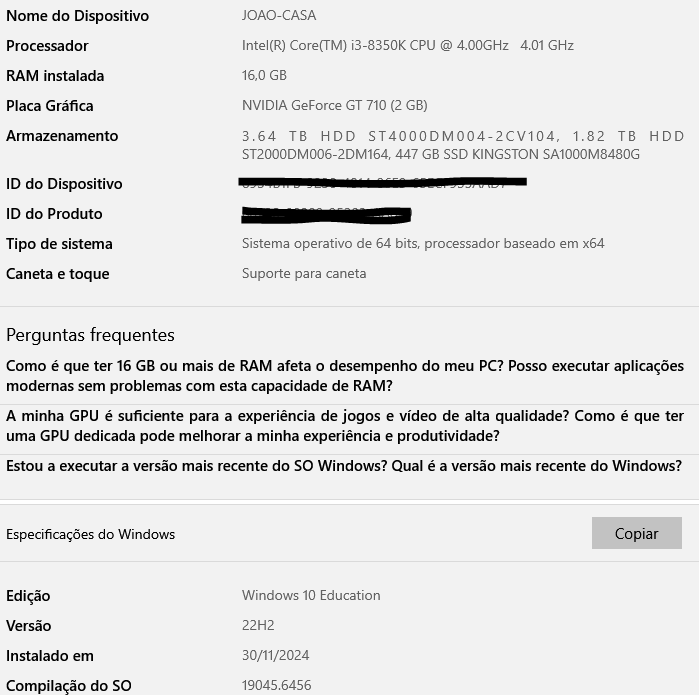
This is the current state of my PC, which I’m starting to feel is running slowly when I edit photos (I apologize for writing in Portuguese, but I hope you can understand).
I don’t feel like buying a new one, but I think I might be able to improve things a bit without spending much money. I’m not very knowledgeable about computers, so I’m asking for help.
Is there anything obvious that I can change to improve my PC’s performance?
Two items that you should look into…
- Upgrade your RAM to at least 32 GB. Be sure to get the correct type and speed for your machine*.
- Upgrade your video card. Today’s software is very dependent on VRAM (Video RAM)**.
*The spec sheet for your machine should have this info.
**My Nvidia video card is 6GB VRAM and I’ve had no issues. Be sure to check the power consumption rating on any card you are considering to be certain it won’t overload the machine’s power supply.
Other things you can do to speed things up…
- Look in Task Manager>Startup and stop any programs you don’t need to load at that time. Do Not disable anti-virus apps.
- Uninstall any apps you no longer need in order to help disk performance.
- Delete “Temporary Files”
There is a nice little program called CCleaner. It will scan your drive for temporary files so that you can safely delete them. It also has other tools you might use, but be sure you know what you are doing.
CCleaner is from Piriform Software.
I hope this helps.
-P
If you can afford it, 32 to 64megabytes of RAM and a new graphics card with 8 to 16 mb vram will do the trick.
@David_Schoen didn’t you mean 8 to 16 GB. 
David, unless Joao is working with video editing, unusually large image files, or playing games, anything over 6-8 GB would be costly overkill, in my opinion.
Joao says he has 16 GB of RAM, but without knowing how many available slots he has on the motherboard, I can’t really say what his upgrade path may be in order to save him some money.
-P