Funeral Bells (+revised)

Revised Version

Revision 1 (latest)
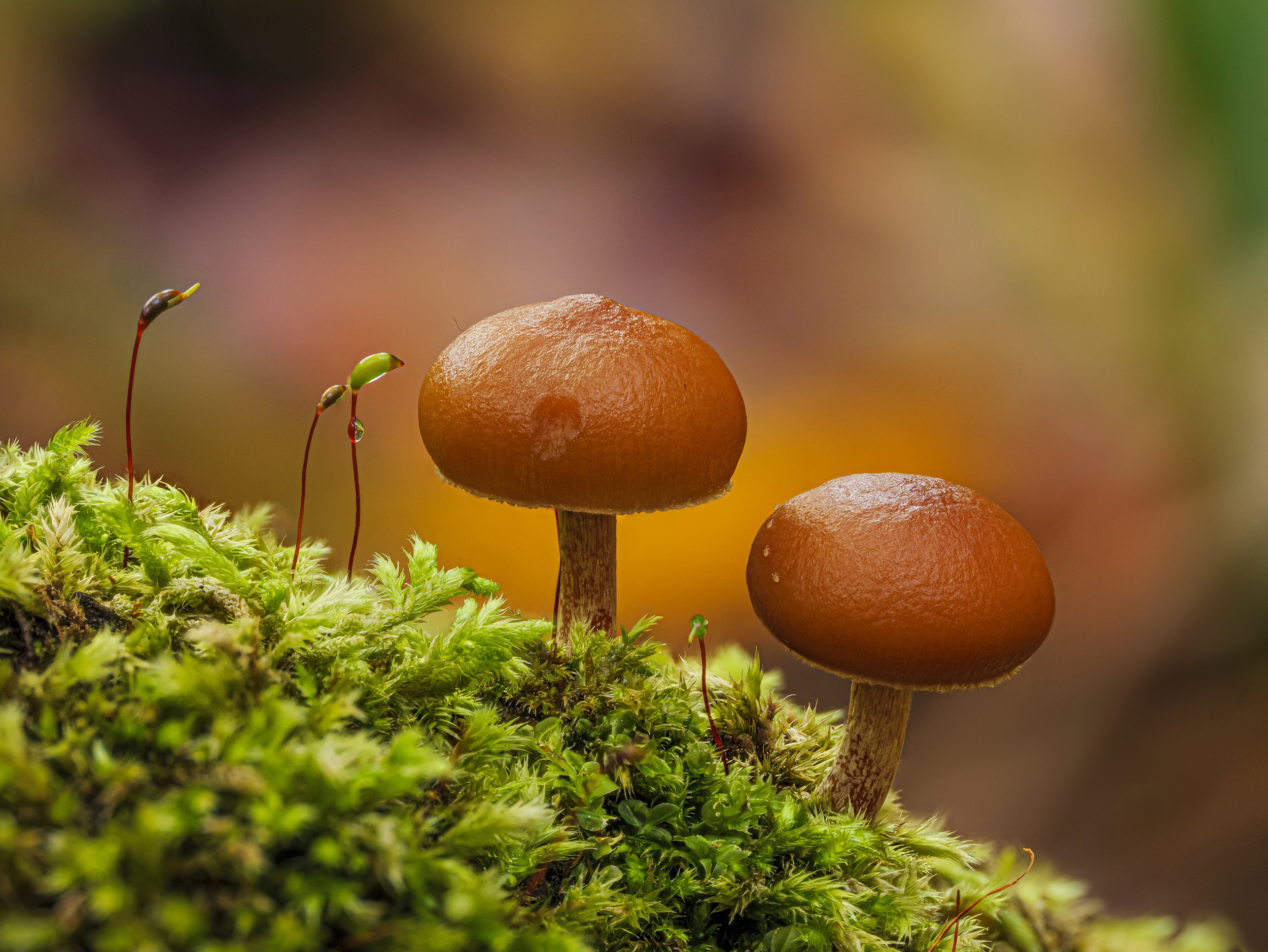
What changed: Removed far left sporophyte and the URC to be more harmonious. At least I think so.

Added after receiving feedback from the community.


Original Version
Weekly Challenge

Autumn Underfoot
9/27/26 - 10/3/26
Critique Style: Standard

The photographer is looking for thoughtful feedback on the image as a whole, especially around the areas noted below.

Feedback Focus: Artistic + Technical

About This Image

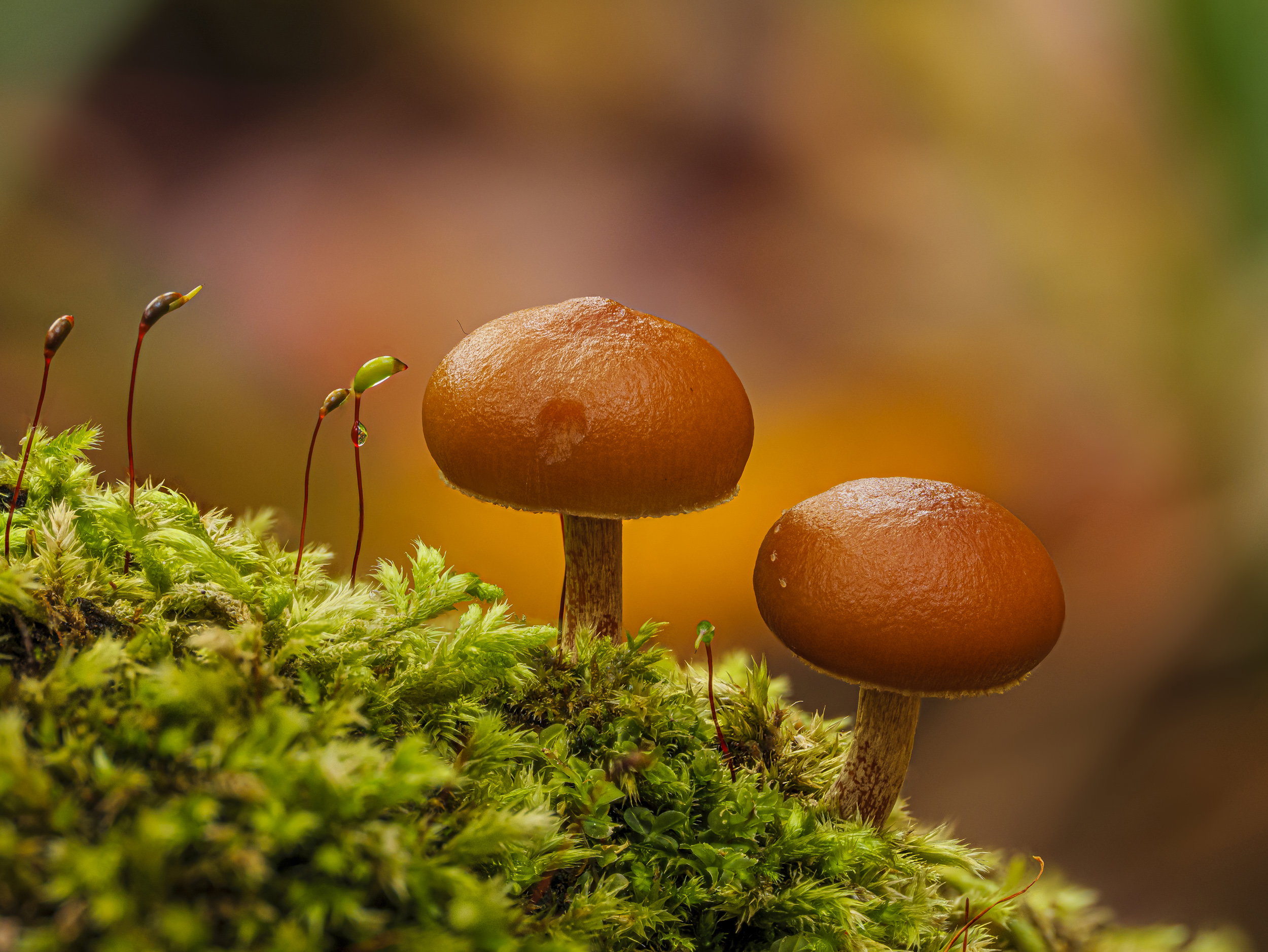
I went wandering in the woods yesterday and came upon a group of Galerina marginata mushrooms, aka Deadly Skullcap, Deadly Galerina or plain old Funeral Bells. As you might have determined, these are highly toxic. But look how cute they are, and something obviously has nibbled one of them, maybe the little critter on the move on the right cap. Toxic mushrooms are not toxic to everything, obviously, but don’t do as they do, at least not with these.

Feedback Requested

Sporophytes are something I love, but I did remove a couple from this final image - should the one on the left go, too? To the left is the streaky weirdness that comes from image stacking so unless I add canvas there, I can’t include more from the originals. Also did I miss anything in the retouching stage? I went over it as best I could and corrected things with various slabs from the stacking process. In hindsight I should have stopped down more, but either couldn’t see the aperture value properly (ah getting old is horrible in some ways) or thought I’d already done so.

Technical Details

Camera: Panasonic DC-G9M2
Lens: OM 90mm F3.5
Focal length: 90mm
Shutter speed: 1/25s
Aperture: f/6.3
ISO: 400

Tripod/handheld: tripod
Focus method: SAF
Filters: polarizer
Technique: several bracketing sessions to cover the part of the scene I wanted in focus
Conditions: humid and breezy

Processing software: Lr, Zerene & Ps
Major adjustments: global adjustments to balance contrast, add sharpness & texture
Blending/stacking: Zerene slabbing for both PMax & DMap which helps paint in the right details in retouching and gives me way less images to choose from, plus the mini-stacks have better overlap detail in critical areas. This is a DMap final image with slab detail added.
Other notes: Final photo cropped slightly, boosted texture & vibrance, removed distractions, PS to soften some of the bg with a blur layer.

2 Likes

Another amazing macro scene and what interesting for me is that in this scene, the even numbers of subjects works where my normal linear brain tends to be drawn to more strict rules of thirds, odd numbers of things in an image. I would not necessarily want to remove the Sporophyte on the far left. But with that said it would not hurt the image either. I just don’t find it a distraction.

At first glance, the moss in the LLC caught my eye and I wish it were more in focus. As I continue to study the image, I can also see the OOF moss complementing the OOF background to frame the mushrooms. When I opened the image up to 100% I was blown away with the detail and sharpness. Well done!!!

Another gorgeous portrait!! The detail is lovely and the colors rich but realistic. I don’t mind the OOF moss in the FG as it blends nicely, and its softness keeps the eye back on the subject. I would remove the sporophyte on the left – it’s a minor distraction that close to the edge.

The softness of the BG is lovely, but the green area in the UL corner is a minor distraction for me. Softening its edge or just cloning it out would be a good thing to try. In contrast, the green area in the UR corner isn’t bothersome – because the edge is softer and the tonal change minor. If you wanted to keep the green in the area on the left, you might darken it to better match the one on the right, blur the transition more and lighten the dark area adjacent. But that’s a small thing for a very strong image. Well seen and presented!!

Beautiful image, Kris. the sporophytes do a great job of balancing the left side of the image with the mushrooms on the right. I do think it might be worth a try removing the left-most of them, just to see how the balance looks without it-I’m having trouble telling for sure from trying to visualize it. To my eye, the retouching looks faultless, though some of the stacking gurus will be sure to find an anomaly somewhere. The out of focus area in the left foreground works just fine for my taste and helps add some depth to the image.

Fantastic, Kris. I second the motion to view it at full size. Wow! That water droplet has a tiny reflection, and there are insects of some sort traipsing across the mushroom on the right. Regarding the left-most sporophyte, I’m with Keith. It didn’t strike me as a distraction nor as necessary, so perhaps, as Dennis mentioned, remove it and see the effect. Perhaps with fewer of them, we would be more likely to notice the droplet on the one closest to the mushrooms.

But really, it needs nothing. Thanks for sharing this,
ML

It’s all pretty much been said. Lovely capture. Thanks for all the technical notes.

I assume natural light??

How do DMap and PMap tend to differ and their uses. I note pmax for detail?

Regards

Huw

Thanks @Keith_Flood , @Diane_Miller , @Dennis_Plank , @Marylynne_Diggs & @Huw_Thomas - glad you guys found this engaging. Mushrooms just enchant me as you well know. I’ll mess with it later when I have time. I did wonder about the light green bit in the URC, so that will get attention.

Insofar a DMap v PMax goes, I find that the latter is noisier by far and often has unattractive haloes around objects that have a distant background behind them. The method does better with small overlapping bits though, I prefer the color rendition of DMap and the less crunchy details that feel overwhelming in a PMax a lot of the time. That said, I will use the Details brush in Zerene to paint from a PMax output image or slab. Unlike using the Pixel brush, it doesn’t transfer the pixel values themselves, but adjusts contrast to fit where you are painting.

1 Like

Wow, this looks amazing. I love the colour, the light and that wonderful detail.

Since you ask, I personally would remove the leftmost Sporophyte. It does feel a crammed along that edge. Also, there’s that small light brown area in the left bottom corner that I would get rid of and lastly I think I’d crop off a bit from the top and also from the right. Then there’s that black “hair” like thing on the upper left of the center mushroom cap. My first thought was to remove that as well but upon thinking about it a bit more I’d actually leave it in as it adds a bit of imperfectness to the image and I like that.

The original poster added a revised version of their image.

Thanks @Tom_Nevesely - the new version removes the sporophyte, but leaves the crop and the odd little hair thing (a cowlick? LOL). I also cooled the WB slightly. Anyway…new version in OP. I think we’re on to something. Thoughts?

The revision is top notch!!

Amazing how much difference in balance that one little sporangia made. This image would make a great example for that subject. Excellent work!

Thanks D&D - it’s amazing what a little tinkering and experimentation can do. I like it better now thanks to you all.

Kris, this is a lovely (and somewhat sadly)inviting look at these deadly mushrooms. Removing that left most sporophyte is good. The lone drop on sporophyte #3 is good fun. I see that a small bug crawled around on the right most mushroom (showing up in 4 frames… :laughing:)

Thanks @Mark_Seaver - yeah, it’s a good thing I’m not of a homicidal bent of mind. LOL. Yeah, that little mite or whatever it is was on the move. I could have cloned it out completely, but decided to leave it in for fun.