Does anyone here have experience with focus stacking in Helicon? I generally find it pretty easy and straightforward, but every one in a while I have an image where I can see the masking on a stack. I’ll try to attach a portion of the image to illustrate what I mean.
It’s usually edges of areas.
If anyone has any ideas about what I’m doing wrong, please let me know. I don’t really have success focus stacking in photoshop, though I’m willing to try if that’s a better solution.
This image is a huge crop but if you zoom in to the line edge of the dune in front you can see the blurry line of the mask I’m talking about. I’ve tried adjusting some of the parameters in Helicon, but it’s still there.
Thank you in advance!

I’m replying to my own topic. After poking around more deeply with the files, I think it’s a case of the program doing the best with what I gave it. I think there’s some focus fall off out to that edge, and then trying to blend it. I think I probably need to take a few more shots in these scenarios to have enough files to blend better. Thought I had plenty, and that I was shooting stopped down enough, but I see focus fall off on some of these slopes that I didn’t see in the field.
I was able to sort of clone the blurry line out carefully in Photoshop.
So I don’t know, maybe I’ll leave this here if it helps anyone.
Living and learning…
I’m no Helicon expert, but do you use it for a lot of my focus blending. In my experience, I think you are correct in the assessment that more shots were needed. When the focus changes so much between images, the blur in one image is so wide it leaves a gap where there is nothing in focus in either image. Taking more allows this area to shrink, hopefully to a level that’s hard to notice when the images are stacked.
1 Like
That’s what I’m seeing now that I’m giving things a closer look.
I thought I had it covered at f14-16, but it’s the focus falloff that is creating the issues.
Do you think that with dune images or other types of images where you have different layers, especially if shooting with a telephoto (100-400), that focus stacking is needed or can it be successfully covered with hyperfocal distance? (I really need to practice working on that…)
I find I get better overall focus with stacking, but that’s probably because I’m pretty bad at nailing the hyperfocal. With that said, I find hyperfocal distance to be somewhat theoretical. While everything is technically in focus, the extremes aren’t necessarily optimal.
I love that the Nikon Z can automate focus shifting. On the other hand, it drives me nuts that there is so much guess work in how many images are needed and how big to make the steps between shots. I sometimes take a hyperfocal, to my best guess, and a stack, then compare. Usually the stack wins.
1 Like
That’s excellent advice, thank you!
I never really know if I should trust the auto stacking, so I usually just do the touch and shoot where I want it to focus, but I guess I need a few more shots than I think I do.
Sometimes it’s just hard in the field to see what you’ve got in the camera. But boy oh boy I don’t miss waiting to develop film just to see you missed it…
1 Like
My camera doesn’t have automatic focus shifting. The stacked images need to have overlapping depth of fields. I read somewhere that a step size of 5 on my camera will result in files that have no overlap but cover the focus range perfect. Another words the focus of the preceding file ends where the succeeding one starts. I set up my focus stack to have a step of 3. However, the smaller the step the more focus brackets you need to cover the entire range.
Sometimes Helicon focus errors when creating the mask even when a sharp bracket is available. I think it’s called ghosting. At that point you can edit your file by manually picking out the sharpest files and brushing in the area that’s not in focus. So you need to look at your files to see if there is a sharp one for the area you say Helicon left unsharp. If there is one then I would use Helicon itself to remedy it.
In my experience Helicon seldom makes errors in images such as yours where distance consistently increases from front to back. The problem it has sometimes is where close and far is closely intertwined in the image. For example, tree leaves in front of a canyon wall. Helicon doesn’t always make a good mask that sharply delineates the gaps in the leaves and blurry wall sections appear between leaves. However, your image is not like that and therefore I think you just lack sharp raw files in the blurry areas.
1 Like
Hi Igor!
I definitely think the issue is that I didn’t have enough images here. The far edge of this dune is just not 100% sharp and that’s what I think is actually causing the issue.
Now I know!
Thank you for your response! I have a lot to think about and practice when i go back next spring. 
1 Like
Julie;
Most non-cine lenses have something called “focus breathing”. I would not be a bit surprised if your lens has it too. Focus stacking using images from a lens that has focus breathing will result in fuzzy edges along the frame. Helicon Focus automatically corrects for this.
Cheers,
Franz
2 Likes
Julie;
Whoops! Wrong answer in my previous post.
Helicon Focus has three different ways to focus stack a set of images: Method A (weighted average), Method B (depth map), and Method C (pyramid). I often find that for a given image, one of the these three methods results in much less fuzzyness between areas in the image that have a sharp transition. Unfortunately, I have not yet figured out which method works best for which image subject. So I almost always have to try all three. [SIGH!!]
On a related note, another program called “Zerene Stacker” uses slightly different stacking algorithms, and those sometimes do better (and sometimes do worse) than Helicon Focus. [More trial and error SIGHs!]
There is a “two-step” technique called “slabbing”, that sometimes helps. In Focus Stacking it requires a feature they call “Split Stack”.
And finally, as a last resort, you have to switch to edit mode and manually brush in those fuzzy areas from one of the image stack frames where that is not present. [Time consuming. SIGH!!]
All the above comments are one of the reasons why I have more grey hairs than other photographers my age when thrashing about (a technical term) when wandering about in focus stacking techniques.
Cheers,
Franz
1 Like
First, I would not recommend trying to shoot some frames with different points in focus. Step through focus brackets, manually if your camera doesn’t have the capability. Just increment the focus in tiny steps. Start a little too close and go too far and isolate the needed set in LR/ACR. You need a good set with good DOF overlap.
I don’t know Helicon but Zerene can have those halos too. (And PS can’t handle large distance gaps at all.) There are two algorithms, PMax and DMap. PMax handles overlaps better, but each has advantages and issues. I run both and can often layer them in PS and mask to get the best of each. But cloning is usually needed to some extent. I imagine Helicon has very similar methods. Stacking can be some work but is often worth the trouble.
1 Like
Excellent advice and so much to think about from everyone!
Thank you!
@Diane_Miller layering different focus stacked methods in PS is a good suggestion, I may try that, plus some cloning if I can’t work it out. And your advice about doing step through is good, and I’ll do that. I used to do that, and then I just thought that if I got each area/corner/layer I’d be all set, but obviously not. Probably not methodical enough.
I also need to make sure in the field that I try one with hyperfocal. It’s just not a method I’ve ever been able to be consistently successful with, but I have been meaning to practice it.
Going out to Capitol Reef area this weekend so perhaps I’ll have a chance to try…
I do lots of focus bracketed/stacked Gigapixel Landscape photos. I also teach workshops on the topic.
Gigapixel Panoramic Photography Workshop
At f/14-16 you are most likely also dealing with significant softness of your image due to Diffraction. You don’t mention what kind of camera or lens you are using. If you are using anything with a 35MP or larger sensor combined with a telephoto lens any f-stop beyond f/11 is going to have Diffraction impacting the sharpness of you image. This is a slide I use in my workshop to discuss this issue. For this Tamron 100-400mm lens, f/8 is the sweet spot for peak sharpness especially in the edges of the image. At f/16 it has started to soften significantly.
Helicon Focus begins to struggle when it is working with soft images due to Diffraction.
I would recommend that you back off to no more than f/11 and see what you get next time. I almost always use f/11 when I am shooting. On extremely rare occasions I might use f/13 if I have a sunrise or sunset situation where I need to shoot sets of photos very rapidly.
Listed below are some good websites that go over Diffraction in great detail.
http://www.cambridgeincolour.com/tutorials/diffraction-photography.htm
https://photographylife.com/what-is-diffraction-in-photography
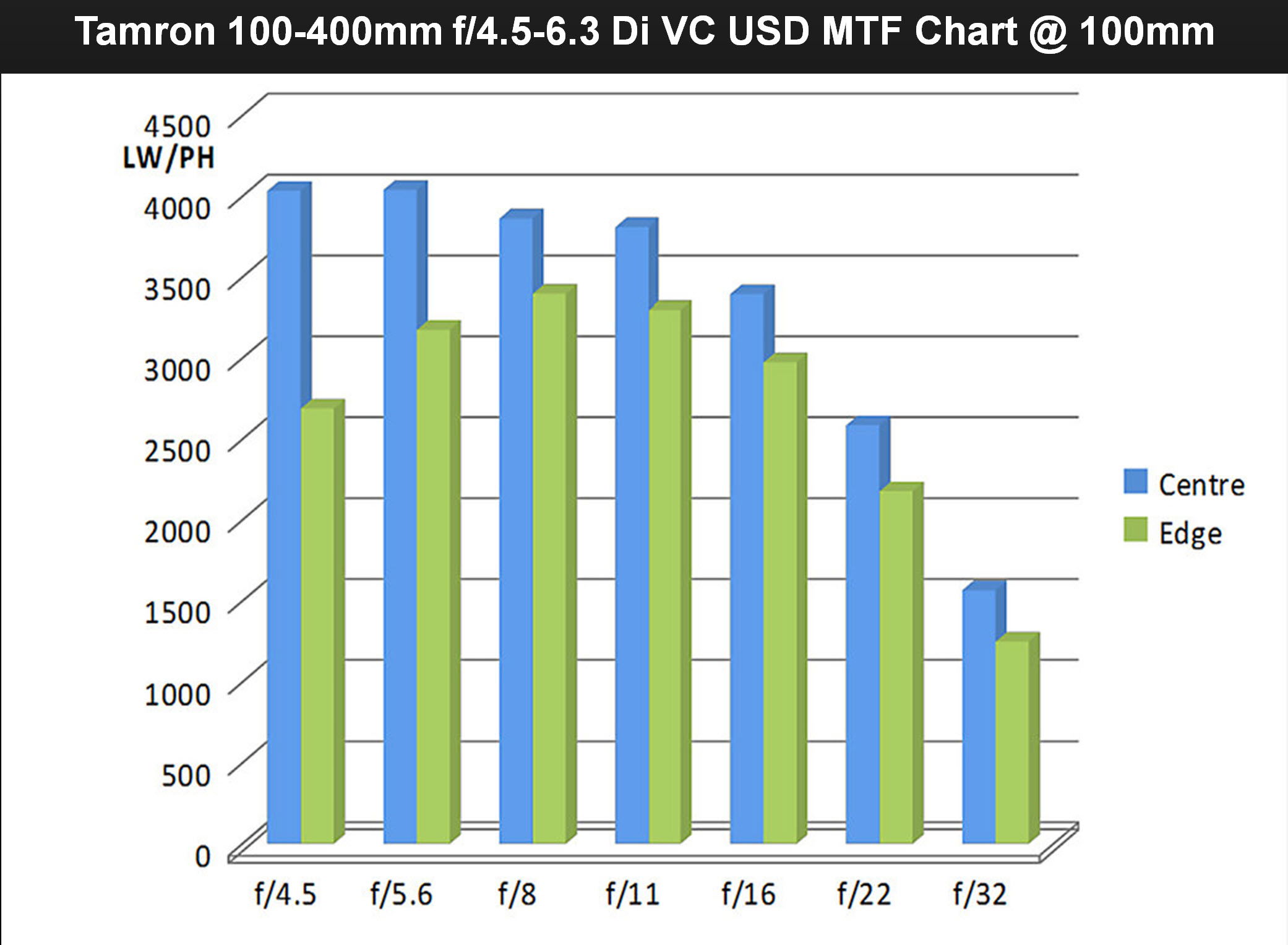
2 Likes
I use Helicon focus mainly for macro photography, but the pricniples are the same.
Firstly you need to establish if the camera body you’re using has focus stacking feature.
If it does, then rather than decreasing Do by using a larger -number, perhaps continue to shoot at f/11, but ensure the increments are smaller / closer together, this can also help lens breathing and fuzziness.
It also helps when stacking in Helicon, as it can then usually reduce the issue you are experiencing. The other thing to also consider is if there is any movement by air in regards to sand particles as this can also cause an issue as can any heat haze.
If you do not have focus stacking on the camera, then you can either consider turning the focal ring incrementally yourself or use a focus rail.
Whichever method, allow an area that you may need to crop off. The reason for this, is as your moving your camera back or forward on a focus rail, you’re effectively changing position and equally if you turn the focual ring, then magnifcation changes (not as noticeable compared to macro).
My advice is this:
- If using focus stacking on camera, shoot in RAW and make a note of whether it starts at the closest point or furthest point.
- If you don’t have this feature on the camera, then i would suggst starting at the closest focal point you want in focus and start at f/11, and use a macro rail and turn it incrementally and slowly.
- Bring all the RAW photos into your editing software and either do some basic editing on one and copy to all the other RAWS or skip to 4.
- Save all RAWS as Tiffs.
- Using Helicon, use Method C if you have stacked front to back or vice versa. If you have stacked in some random order (as some people do), then another Method would be worth while. Also consider your smoothing options etc, perhaps try with smaller numbers.
- Export as a tiff and edit in RAW editing / final touches and then save.
Hope this helps you.
I know that the post is months old, but I’m going to pitch in how.
You’re not doing anything wrong. And it’s not Helicon, it’s optics. If you have two overlapping objects at a distance from each other, the back image is going to have blurry parts from the front thing, and that’s going to obscure the back thing.
There’s no way around it, other than a great depth of field to get both things (mostly) in focus in the same shot.
I’ve run into this with both dunes and flowers. I’ve not worked out a methodology yet (because I’m lazy, and often just make do) but I think a tighter aperture and smaller step size will give Helicon, et. al., more choices. I also render all three methods to see how things play out.
I shoot RAW images, and convert to DNG in HF, with the hope of deleting the original RAW images. But I tend to stay in LR as much as possible.