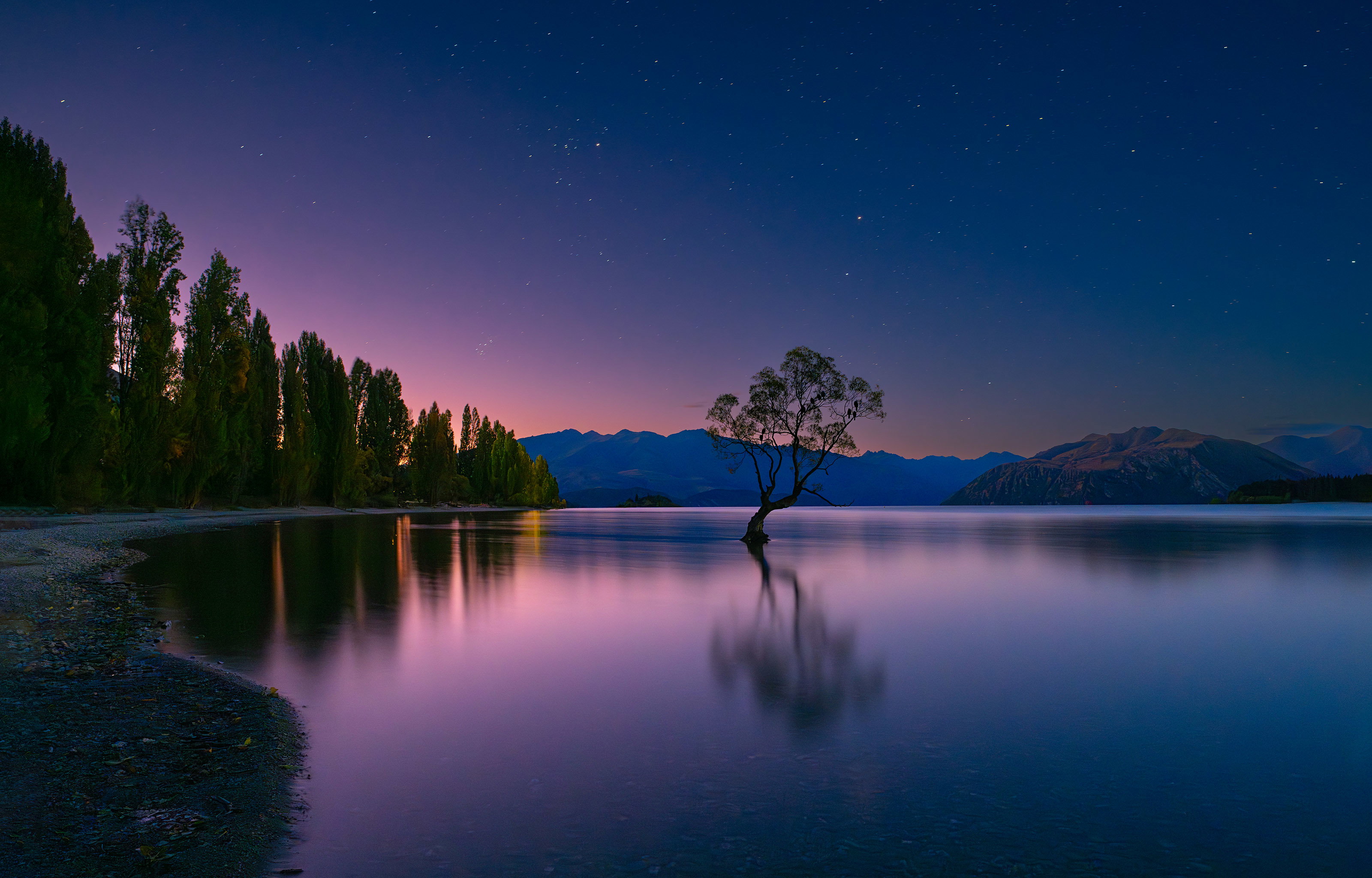
Hi Sean! This is Richard Handler nearby in Jacksonville. I want to see how you’ll handle this low light astro.
My processing in LrC with LrC masks is OK but introduced halos around the fine details of the tree crown. The casual viewer might not notice, but since I’ve seen them, I cannot unsee them. I think it was introduced in applying a sky mask, then adding texture to emphasize the faint stars.
NR was in Topaz DeNoise. Handling the brightness of the western sunset and minimizing the artificial light from a camper on the peninsula mid left were challenges. (You might do wonders with TK masks?) I cropped out and healed over shore lights and navigation buoys. Your artistic vision will also be welcome.
The Wanaka Willow, which sprouted from a 1930s fence post in shallow water, may be the most photographed tree worldwide these days. We spent March in NZ & went through Wanaka.
Pre-focused my 21mm Zeiss Loxia during daylight at roughly the distance to the tree from where I planned to place my tripod. Essentially this was at infinity for 21mm. Choose f/8 as a compromise for DOF to cover tree and sky, yet keep the shutter to 30". This dictated ISO 1250. For my vision of the final product minimal star trails were acceptable. Camera height was adjusted to silhouette the tree crown in front of sky, while still capturing the entire tree reflection. R/L tripod location was chosen to center the tree between the peninsula on the left and the more distant shore on the right. (61mp Sony a7Riv, ISO 1250, 30", f/8)
I hope you’ll also see 9 crows roosting, but if your count differs from mine we’ll flip a coin.
Raw File
WanakaWillowImport.dng (52.5 MB)
You may only download this file to demonstrate how you would process the image. The file is Copyright of the photographer, and you must delete the raw file when you are done. Please post a jpg of what you created, along with an explanation of what you did and why you did it.
My Edit (click to see)
Hi Richard, to clarify things; Sean may or may not pick this, that’s up to him. But other people can experiment with your raw file, that’s the real fun here is seeing what everyone else would do. Sean is just a bonus!
David, the more, the merrier. I should redo it with your method using the color channels of the tone curve tool.
I finally had some time over the weekend to have a go at processing this image. I find the whole exercise of editing images that I didn’t shoot myself rather enjoyable and because I don’t have the associated memory of shooting the image, I feel freer to take the image in any direction that I feel suits it best. With that said, here is what I did:
- I opened the image up in ACR and did some basic edits – white balance, exposure, contrast, shadows, and highlights. I also cropped the image in this step.
- Next, I cloned out some of the distracting bright “spots” in the image.
- Then I slightly desaturated the bright area of trees to the left of center. I only did this a little bit because it looked unnatural when I took it too far. Ideally I would spend more time on this and get rid of the brightness entirely.
- Next, I brought the image into the NIK Vivaza plugin to give the image a bit of “structure”, and I darkened down the sky and lightened up the tree.
- Then some of TK’s LIGHTS and DARKS Triple Play to add some micro contrast to the light and dark areas of the image.
- Next, I used curves to brighten the image and add even more contrast.
- Then a cool “photo filter” to decrease the warmth.
- Then a color balance adjustment layer to decrease the reds (add cyan), increase the greens (reduce magenta), and decrease the blue (to add yellow).
- And finally, I cloned out the 2 black/dark areas on the beach on the left edge of the frame.
Tom, thanks! That is also a nice presentation using more of the frame and showing more of the reflections.
Fabulous image Richard. So I brought the image into LRC to bring up the shadows (a lot) and tone down some highlights. I noticed quite a bit of noise as a result so I ran the new LRC denoise next which did a great job. I made some adjustments in the calibration tab to alter and enhance some of the colors. I also made some subtle sky and foreground adjustments in LRC. I brought it into PS Beta and used the remove tool on the human created bright areas. I cropped some from the right and added just a bit of canvas on the left side. Finally I added just a tad of Soft Pop from the TK actions.
Steve,
Very nice! Makes use of the entire image, shows stars, shows the nice reflection of the forest. I had not visualized it this way, but I also like this presentation. One reason I did not visualize what you did is that in real time it was too dark for me to think of the forest on the left as anymore than shadow. It was very much a night landscape. Thanks for the effort and explanations.
Richard