Hi David,
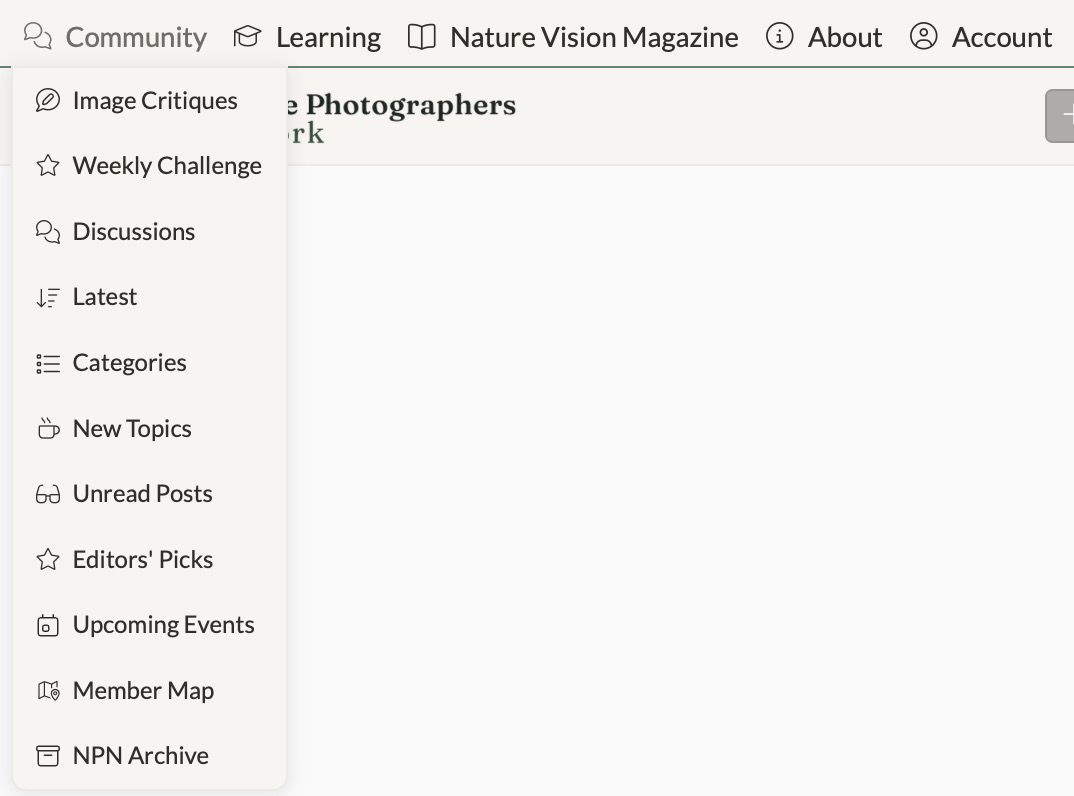
I pretty much live in “Image Critiques” except when I want to post in Weekly Challenge or Discussions. I don’t use the others because EPs show up at the top of Image Critiques and I tend to navigate visually, by image, not whether I’ve read it or not. I think “Unread” is probably crucial for moderators though.
What is “New Topics”? Is that recent Discussion Posts? If so, that feels like duplication with Discussion Posts. If there were a filter on the Discussion threads there, that could be enough.
Edit: Just noticed New Topics is new posts for Critique. Is there a reason for New Topics and Image Critiques now that we don’t have the Galleries that were not critique related? Maybe rename New Topics “Image Critiques” and rename Latest “Latest Replies” and then those three become 1?
I had a thought, related to the desire some had for Latest to be by order of post. That’s how Image Critiques is organized. Could you rename “Latest” to “Latest Replies” or something to clarify that?
I use all of the items in the Community drop down infrequently. I’m not aware of any other way to get to the archive, though I’m glad it is available. I usually use the other methods to access the other items.
I generally use the “sidebar” next to the NPN logo to access most of what I need and rarely use the links you referenced at the top. Of course, now that you’ve brought this to my attention and I’ve scrolled through these, I can see “Community” being useful and there should be any easy accessible place to view one’s account.
I used to use Categories almost exclusively because I could get from it to where I wanted to go the most. With the replacement of forums with tags, I don’t use it anywhere nearly as much, but there’s some stuff there that I’d like to keep handy. Other than that, my current go-to is Image Critiques. Since I can get to the other stuff pretty easily with filters there, that’s all I need.
PS while it’s not part of the question, I think Image Critiques should be right at the top-that’s what we’re here for.
Hi Marylynne, while that’s a good idea, we do still have the Discussions area, and the text would change there as well.
Again, good thought, but Latest is a bit more accurate, since a new post would also come to the top, so it’s not just about the latest reply but the latest posts as well.
Thanks, Preston. If you have a moment, could you be more specific about which items you use under those top-level menus?
Under “Community”, I use all of the items to varying degrees except for “Upcoming Events”, “Member Map”, and “NPN Archive” which I rarely use.
Under “About”, I use “FAQ/Guidelines” the most but have used the “Contact” and “Help” once or twice. I do believe, though, that all the choices there should be maintained, especially for new members (or long absent returning members) so that they can more easily get acclimated to NPN.
Under “Account”, I have used all of the items at one time or another. I think the list should be maintained as-is.
I don’t use the Community drop down menu all the often, but when I do, I tend to just poke around at all the options just to see where it takes me. I like the map feature just to see who is around the country and world.
Like @Allen_Brooks, I seldom used the top 5 dropdowns. From the sidebar, Categories is my go-to, while Weekly Challenge and Upcoming Events I sometimes use, Latest occasionally. Now that I have changed my desktop link to go directly to the Macro/Close-up category, I do use Community more, but simply to move on to the sidebar categories.
Hi David,
If I’ve got this right, you’re asking which of the 5 header drop downs do I use most often? I frequently use the community dropdown menu and the account menu dropdown menu but almost never use the other three headers (Learning, Nature Vision Magazine and About).
Now, if that’s not what you’re asking but rather you want to know which links I use under each of the headers then I would say that I use the community header by far the most in order to access Image Critiques, Categories, and Member Map and rarely anything else. These are the three things I’m most interested in here at the site although now that I’m browsing through the drop downs I will probably use the Learning Dropdown to access Articles and Ask Me Anything.
This new layout has me intrigued and I will definitely take more time to browse the menus and links but I am almost exclusively interested in viewing and commenting on member posts.
Thanks for what you’re doing and taking the time to run your ideas through some of the members to get their thoughts. You really make this feel like a community.
I’ve used all the dropdown menus at times, but I mostly just use Community where my top categories are Image Critiques, Weekly Challenge, and Latest. Sometimes Discussions, but I more often find them under Latest.
I noticed that New Member Images doesn’t seem to be part of any dropdown list and I think it should be present somewhere. An oversight or was it never there in the first place? There are so many ways to get to content here, it seems a shame that some views eliminate those posts entirely.
Ah ha - there it is on the side bar navigation panel, which I don’t use that often.
Thank you all for the thoughtful feedback; it really helped shape the direction of the redesign.
If you refresh the page, you’ll see the updated header dropdown menus. They’re now organized around how you’re most likely to use the site rather than by structural categories. The goal was to simplify things, reduce redundancy, and make navigation feel more intuitive alongside what already exists in the sidebar and UI.
I also streamlined the Create Post menu to make participation clearer and more focused.
Take a look and let me know if anything feels missing or out of place. My hope is that the cleaner structure makes the site easier and more enjoyable to use.
So far, this looks fantastic to me, David. The Image Critiques drop down is perfect, and the other drop downs are more clearly defined by what they contain.