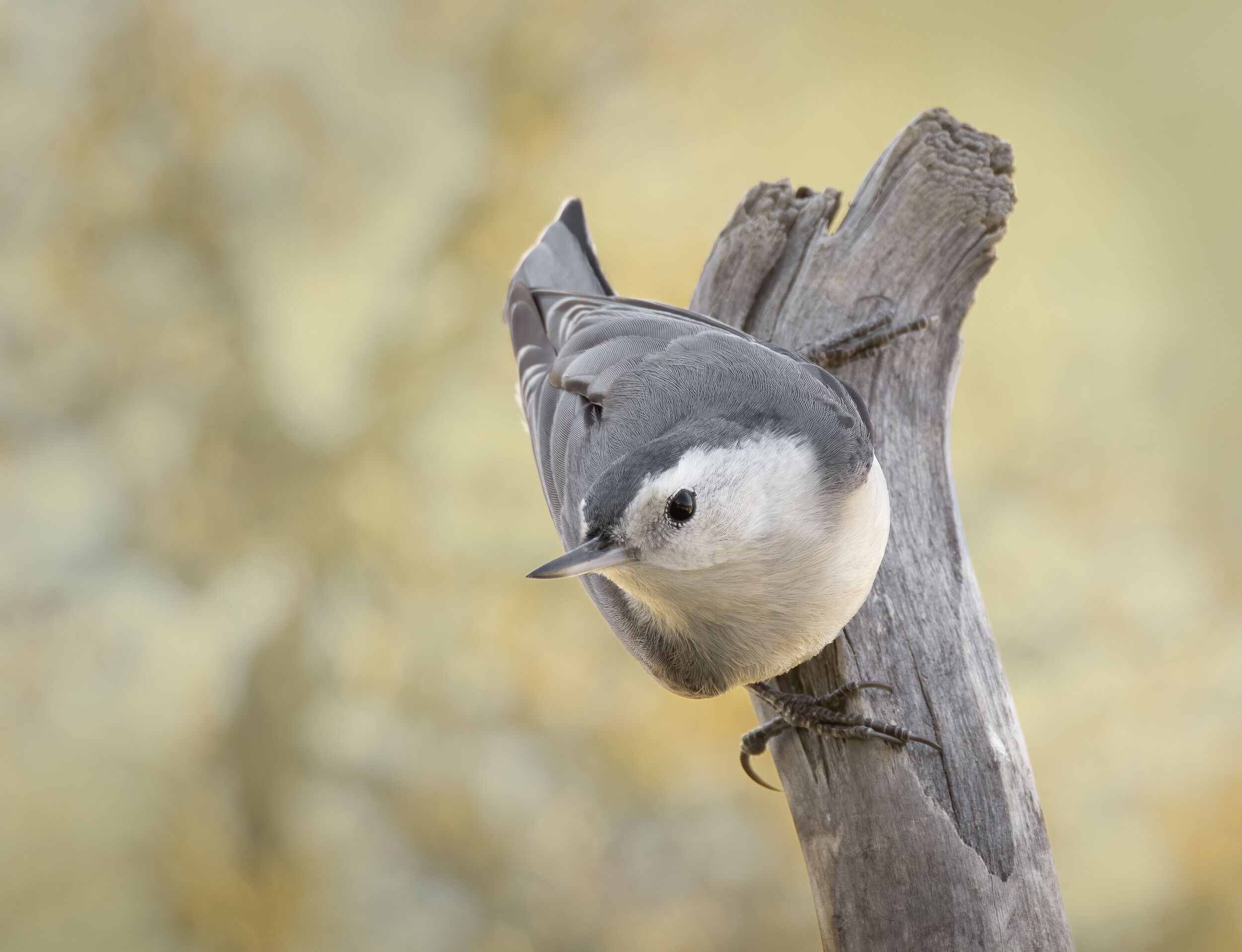
This was taken 3 weeks ago at our feeders. I love these busy little acrobats and the challenge of catching them.
Specific Feedback Requested
All comments welcome!
Technical Details
Is this a composite: Yes
The BG was basically this color but very plain so I grabbed an OOF shot of a nearby tree and substituted it. Used blend mode Multiply at 50% opacity to make it blend better. Two subsequent frames of the bird in a burst were focused slightly differently, one better on the head and one on the body (slightly) so for fun I combined them.
Canon R5, 100-500 2X at 686, ISO 1600, f/11 (wide open), 1/125 – very thin ice for this twitchy little bird. Sturdy tripod, Wimberley II head. Cropped to 32% of the full frame.
That is a cute little bird and a nice pose. BG looks good as does the combination of the two bird photos. They really extend the dof. and all the fine feather detail. Nice composition also and frame size looks good. Well done.
Hi Diane
Better photographing through newer editing software? You’d a really great job on this composite. The background has enough detail to make interesting and the Nuthatch’s body line up with good feather detail.
Nice work
Peter
Ps what software did you to make the composite?
Thanks guys ! @Peter_Morrissey (you don’t come up as a link), not better photographing but better results. The negative is only the score; now we can all be master printers. All my compositing is done with layers and masks in PS. Sometimes initial coarse selection can be done with various selection tools but always refined at 100% with the Brush tool. Layer properties such as contrast and color are adjusted for matching with various adjustment layers linked to just the specific layer. Sometimes a layer will be put into a blending mode (as with the BG here) for more subtlety and/or the opacity reduced.
Wonderful photo of this little Nuthatch Diane. Love how the bird’s coloring and the limb are emphasized against the OOF background. And thanks for sharing your post-processing techniques, love learning new ways to get better results.
Thanks guys ! @peter (you don’t come up as a link), not better photographing but better results. The negative is only the score; now we can all be master printers. All my compositing is done with layers and masks in PS. Sometimes initial coarse selection can be done with various selection tools but always refined at 100% with the Brush tool. Layer properties such as contrast and color are adjusted for matching with various adjustment layers linked to just the specific layer. Sometimes a layer will be put into a blending mode (as with the BG here) for more subtlety and/or the opacity reduced.
Hi Diane Better photographing through newer editing software? You’d a really great job on this composite. The background has enough detail to make interesting and the Nuthatch’s body line up with good feather detail.
Nice work
Peter
Ps what software did you to make the composite?
Hi Peter, I replied to your question but can’t get you to come up as a link. Maybe you should check on that…
Hi
Diane Miller
Better photographing through newer editing software?, was a question not a comment. Your work on this photograph was outstanding. I was only asking the question, should there be a limit on what can be added or remove from a photograph and still have it called a nature photograph? The photography editing software has advance in the last 2 years to a point were changing out the background or combining multiple frames into a high resolution, high dept of field image, can produce a photograph that looks like a bird in its natural environment, but is in reality an artistic rendition of the natural wildlife.
I am hopeful that our photographers could help set some guide-lines.
@peter (you don’t come up as a link). Diane, I have zero understanding of links. This is the only web site I post to.
Thanks @Peter_Morrissey – I hadn’t understood your comment. You raise a very valid point. I feel the darkroom techniques of Ansel Adams and others set some reasonable limits – i.e. things like tonal and sharpening adjustments, and realistic color control. I was mostly referring to things like that for better photography – the ability to make better “prints” – which is basically what our digital files are – the performance from the digital capture, which is the score. Things which make that possible have improved quite a lot during my photography lifetime, along with cameras.
Things like extensive cloning and BG replacement tools are actually not that remarkably improved in recent years, at least at the higher end of software. I suspect that the main improvements to altering reality lie in the lower-end software like Photoshop Elements and other similar things.
I do like to “paint pictures” sometimes, but will always disclose it, and share techniques. And I’m very happy to see such images accepted and critiqued here. It wasn’t that long ago that diehard film people had fits about the legitimacy of digital images.
Links: When someone posts in a thread in response to something a previous poster said and wants them to be made aware of it (by email) – I’m referring to typing the @ character and their name. A list of suggested people will pop up and I can choose one, and their name then shows highlighted – which I called a link, but that’s probably not the right term. But when I do that your name doesn’t come up like the others do – but if you’re getting an email that I’ve posted this, then it’s working even though it doesn’t look like the others. I see above it does show highlighted, so I guess it is working.
 | | ## peter |