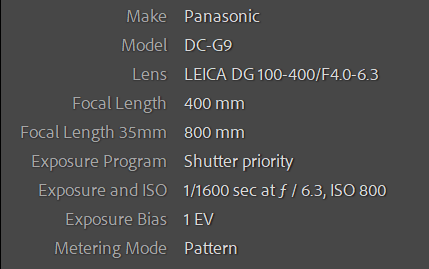
Yep, another eagle in a tree. Not so close as last month, but I still didn’t get out of the car, just shot across the road and about 30-ish feet up. This time it was keeping watch over a large overgrown field and not chowing on tasty roadkill. Also, the tree was farther off the edge of the road than December’s eagle, so this is a slightly bigger crop. I was out hunting for abandonment, but who wouldn’t stop for this, too? I really just have to leave the 100-400 on the camera and keep it on the seat with the proper settings. To wit -
This is an example of me having a “doh!” moment - I switched to my wildlife custom mode, but forgot to move the drive to burst. Don’t know why - both switches are in the same place. As a result this is the only take off shot I got. Doh!
Type of Critique Requested
Aesthetic: Feedback on the overall visual appeal of the image, including its color, lighting, cropping, and composition.
Technical: Feedback on the technical aspects of the image, such as exposure, color, focus and reproduction of colors and details, post-processing, and print quality.
Specific Feedback and Self-Critique
Processing this gave me fits. Subjects like this against that blank, overcast sky tend to produce fringing in even the most spendy of lenses. That’s what happened here and so I struggled with correcting it and keeping Topaz Sharpen AI from creating haloes in the repaired areas. Oy vey. Is this a good compromise in that respect?
Technical Details
Handheld out the car window, braced on B-pillar - handy those things!
Lr for a wb adjustment and some brightening even though I overexposed quite a bit for this. Cropped and then into Topaz Sharpen. Finally to Photoshop to remove small branches that weren’t helping.
Kris, the comp is terrific and that intense stare is just awesome. I might consider cropping or cloning out the very bottom branching in the lower right. And of course it would be terrific if there were no branches in front of the eagle, but that’s a rare thing anyway.
I think for getting only one shot, this is the one to get. Love the anticipation of take off. Well done.
Amazing, Kris and with just one shot! I truly can’t imagine. The expression in the eagles face and the clarity of the feathers is what caught my attention right off. Aesthetically the color, lighting and all are spot on, IMO. Technically, I can’t address as you are heads and shoulders beyond my post processing abilities. Very nicely done.
Thanks @David_Bostock, @Dean_Salman & @linda_mellor - I’m just glad it let me hang around with it for as long as it did. Probably used to people pretty much, but fed up anyway. I have a couple of boring perching shots, too, but this one has more life.
That lower branch was also a bugbear. Let me see what I can do. Wasn’t sure if it gave some context to the whole set up.
Came across another eagle in a tree on the side of the road today. LOTS more branches in the way, so don’t know if it’s worth a damn, but what the heck. I need a bumper sticker - I BRAKE FOR EAGLES!
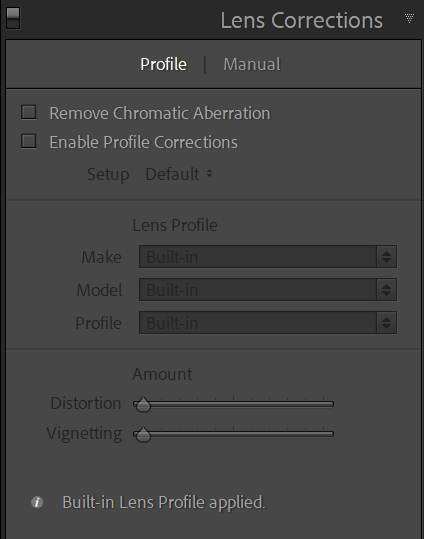
Very nice Kris, especially for shooting the old fashioned way. I’m surprised you’re having trouble with fringing these days. If you scroll down the adjustment menu in LR there’s a category called “Lens Corrections”. Surprisingly, it doesn’t seem to be turned on by default, but if you turn it on, it’s pretty good at taking care of that sort of thing.
Hey thanks @Dennis_Plank - I’m not sure what you mean by the old fashioned way, but I’ll take it as a compliment!
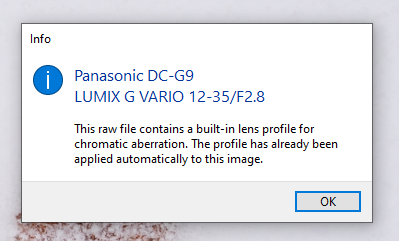
I don’t often encounter lens fringing, but it did come up here and occasionally with other images - mostly really contrasty ones. Strangely, only MFT cameras have lens correction baked into Lightroom in the Lens Correction panel. I never have to turn it on unless I want to make changes to the underlying work Adobe has already done.
Click the little info button and I get what lens it has identified (obviously not for this lens/photo, but an example) -
Sometimes I use the fringe correction and other times distortion. I did with this photo and it helped, but the way it works can often create other problems. It’s basically swapping the offending color with its opposite on the color wheel and if that is a lighter color, sharpening can exacerbate it and make a halo instead. All compromises we have to make!
Hi Kris, nice pose you caught - good timing on your single click! I think you did well on the post processing. I’d have to pixel peep way beyond a reasonable amount to notice fringing. Well done.