The photographer is looking for generalized feedback about the aesthetic and technical qualities of their image.
Description
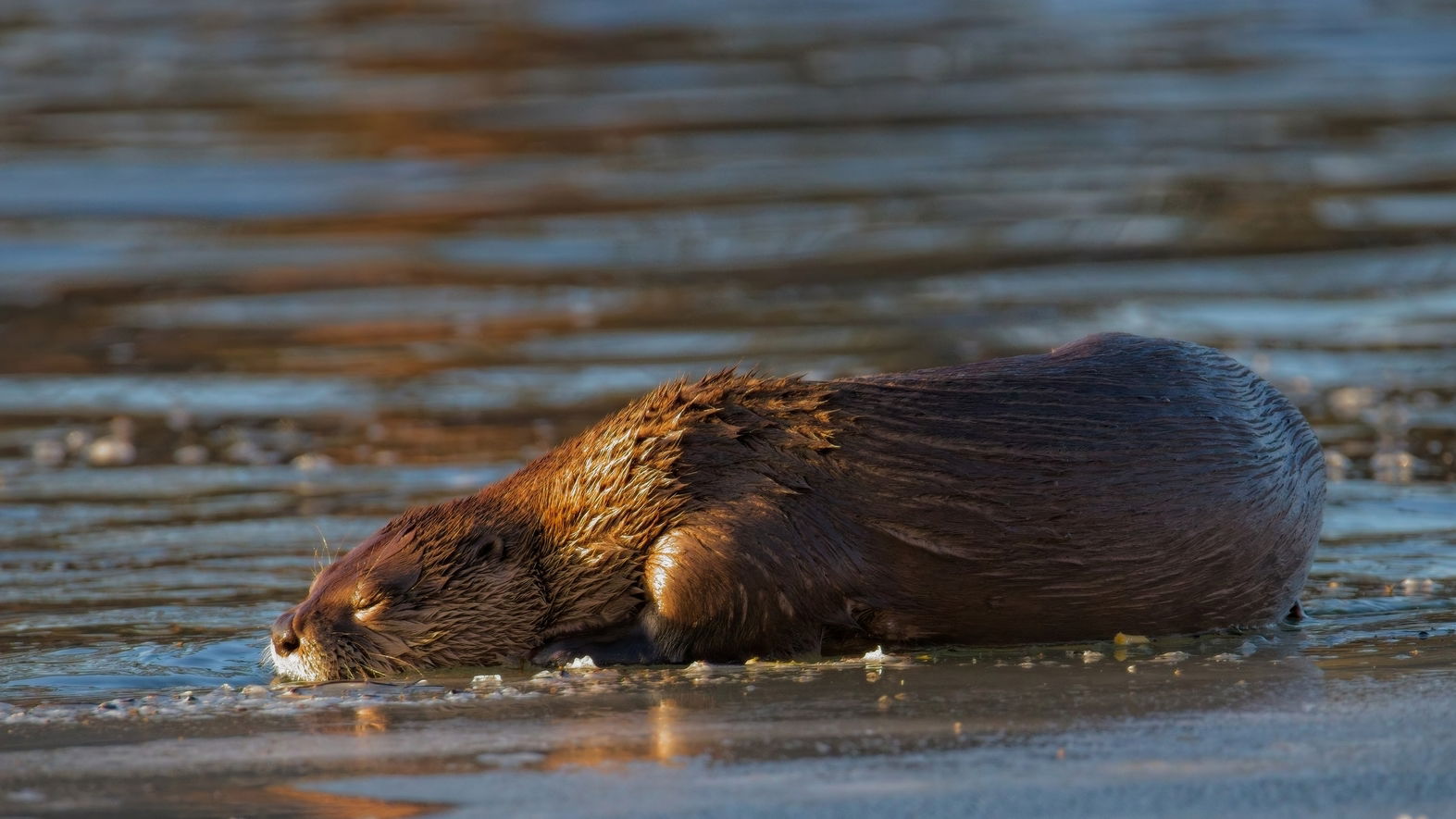
I love winter…especially winter light. I no longer struggle with harsh mid-day light. This river otter was resting on an ice shelf near my home in Montana, winter 2025. I was blessed that the otter decided to nap about 20 meters away from my position and the otter was facing the late afternoon sun.
Specific Feedback
One thing I find challenging is bright blown highlights when a wet subject emerges from water.
I think a polarizing filter would cost me precious light?
Technical Details
Canon R5, RF 200-800mm lens at 800mm “wide open” at F9
1/1600 sec ISO-12800 +1.7 fstops
I had a fast shutter speed because I was also photographing otters in action.
And I overexposed to compensate for a bright, wet background.
I edited the Raw file using ON1 Photo Raw 2025.
Critique Template
Use of the template is optional, but it can help spark ideas.
Vision and Purpose:
Conceptual:
Emotional Impact and Mood:
Composition:
Balance and Visual Weight:
Depth and Dimension:
Color:
Lighting:
Processing:
Technical:
Oh so wonderful. Otters are great. Until they poop all over your lawn and dock. Then not so much. I do like the calm and casual nature of the nap though. Master of its small domain for sure.
Highlights can be tamed with the use of a Linear Profile sometimes. If you use Lightroom at all or ACR, you could try using a linear profile created by Tony Kuyper. What that does is completely flatten your tone curve which is not what typical RAW editing profiles do. Instead those will often boost highlights and reduce shadows for immediate contrast which makes people happy. I find that with photos that have a big dynamic range, I often see that what I thought were blocked blacks and blown whites are indeed ok, and it was the Adobe or other camera profile that was creating the problems.
You can find Linear Profiles on Tony’s web page as well as more technical information about how they work and how to use and install them -
They are free and if you don’t see your camera, Tony will make one for you. He did for me!
Thanks Kristen. Where on the photo do you think highlights need to be tamed?
The brightest is below the tip of the nose, but the highlights there are not blown out,
and I think bright in the face area is usually a good thing, drawing the viewers attention.
I don’t mind bright pieces of ice to help show the frozen environment.
Where on the photo do you think the highlights should be reduced?
The brightest is below the tip of the nose, but the highlights are not blown out,
and I think bright in the face area is usually a good thing drawing the viewers attention to that area.
If I reduce the highlights of the few pieces of ice, the cold winter feel is reduced.
With my calibrated Eizo monitor, I don’t see much detail in the nose area. As @Kris_Smith stated, using linear profile adjustments in Lightroom will make those bright areas more reasonable. The ice pieces look fine as presented. Wet critters photographed on a brightly lit day can be challenging to say the least. I edited your Jpeg and ran it through Adobe Camera Raw and boosted shadows and reduced the highlights with the provided linear profile. You will get much better results by doing these edits on the RAW file as well. …Jim
Original: